
Xuper TV APK v7.8.1 Download Latest Version Android [2026]
Movies, series, anime and live channels on your Android
Xuper TV is a streaming app for Android that brings together movies, series, anime, children's content, and live channels on a single screen. Here you'll find the two current files, one for your phone and one for your TV, along with a clear guide for installing them.
Secure installation
- File reviewed
- No root
- Free
App information
| Name | Xuper TV |
| Latest version | v7.8.1 |
| Mobile APK size | 51.1 MB |
| APK size for TV | 32.4 MB |
| System | Android 5.0+ |
| Category | Entertainment, streaming |
| Content | Movies, series, anime, children's programming and live TV |
| Language | Menus in English; synopsis and Latin American audio in many titles |
| Price | Free |
| Requires root | No |
| Updated | November 2026 |
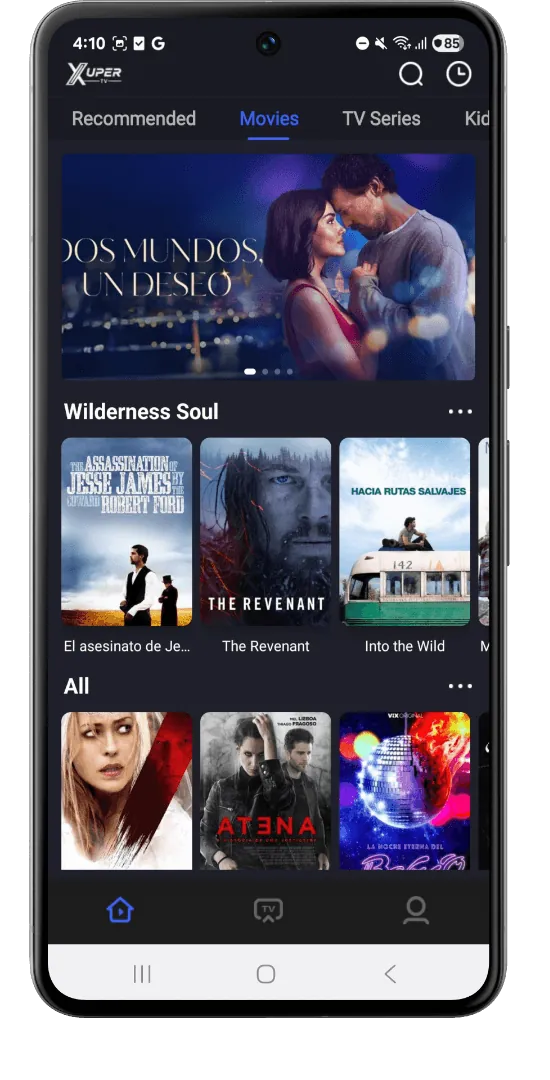
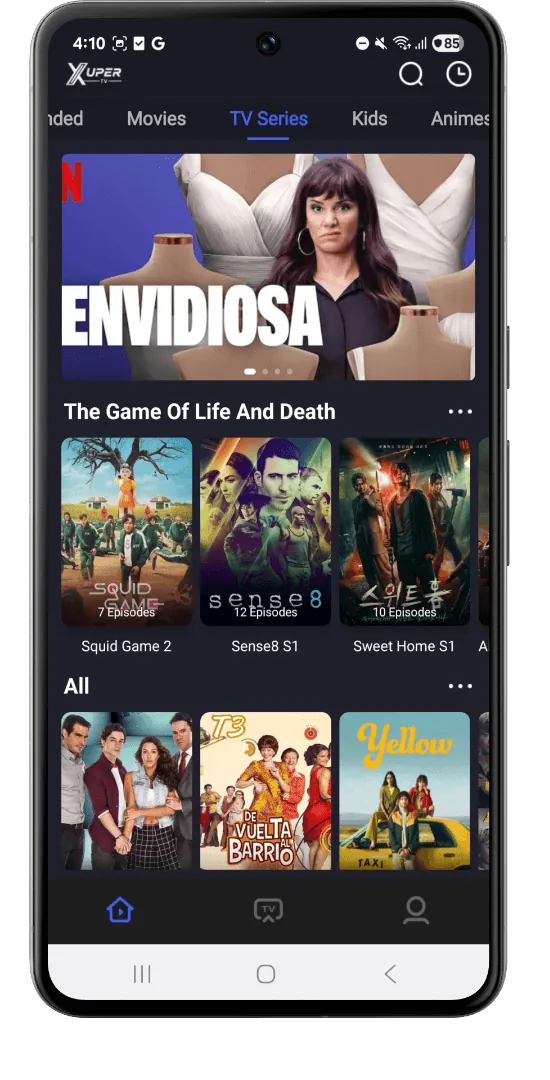
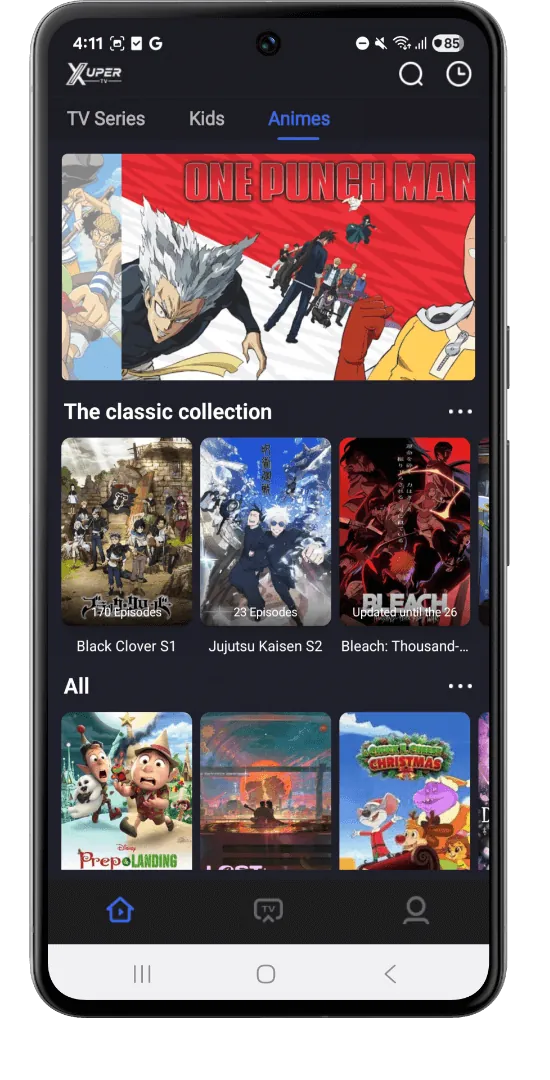
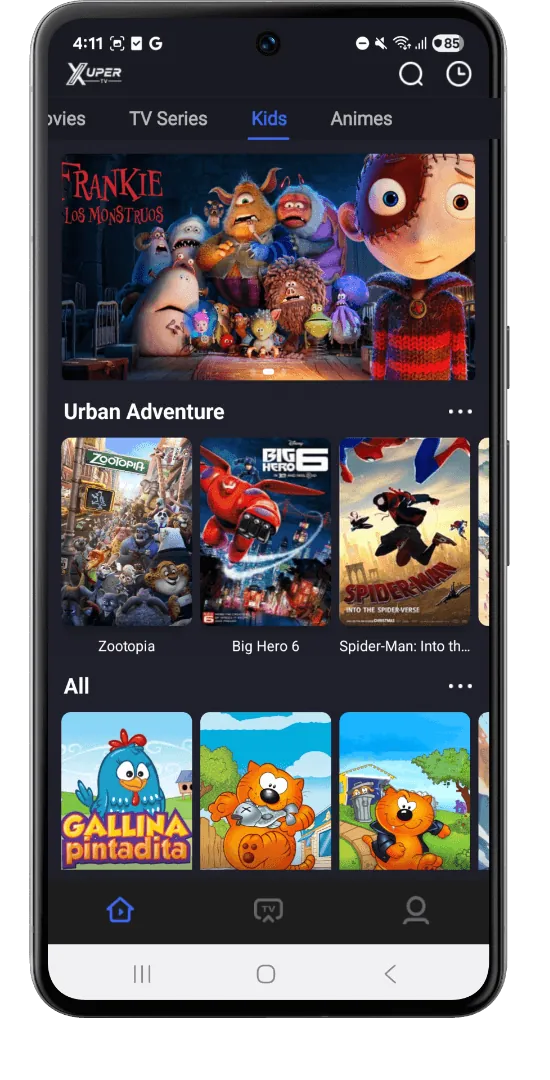
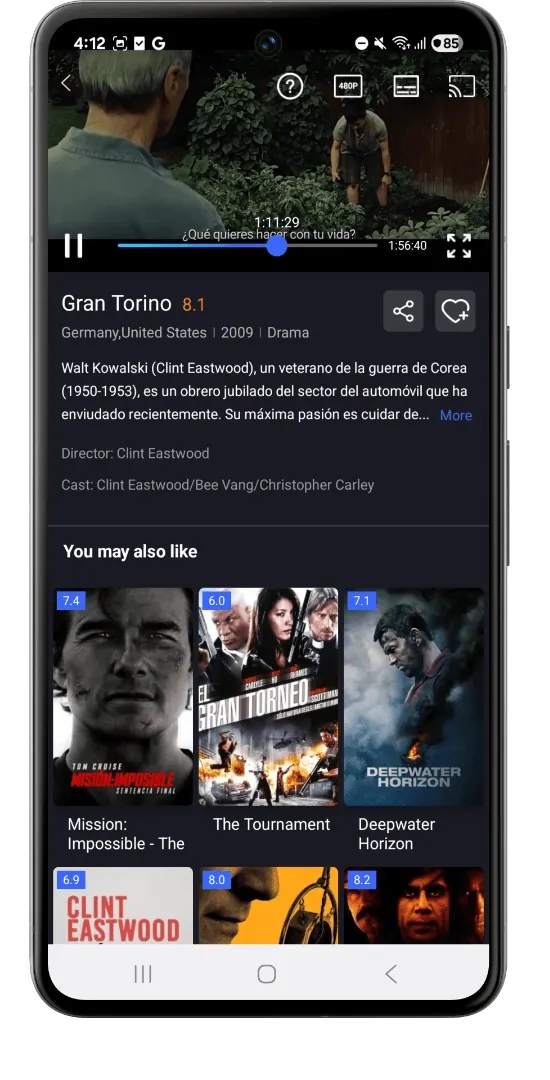
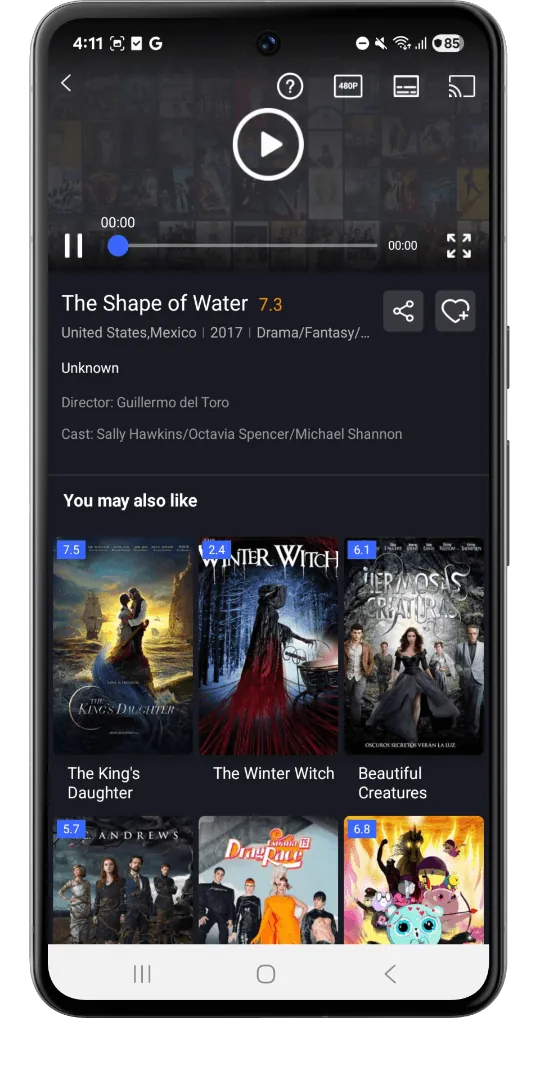
Actual screenshots of the app on an Android phone. The cover art belongs to their respective studios and is shown only as a reference for the interface.
Table of contents
- What is Xuper TV APK?
- Main features of Xuper TV
- Catalog by tabs
- Live Channels
- Player with quality and subtitle controls
- History and continue viewing
- What does the latest version include?
- Mobile APK or TV APK?
- How to download and install Xuper TV
- First steps within the app
- Xuper TV on PC, iPhone and Smart TV
- System requirements
- Advantages and disadvantages
- Is it safe to install Xuper TV?
- Alternatives to Xuper TV
- Tips for better viewing
- Conclusion
- Frequently Asked Questions
What is Xuper TV APK?
Xuper TV APK is the Android installer for Xuper TV, an entertainment app that brings together movies, complete series, anime, children's titles, and a live TV section in one place. Since it's not downloaded from the Google Play Store, it's installed using an APK file, similar to many video apps circulating in Latin America.
The idea is simple: you open the app, choose a tab, and start watching. Each title has its own information sheet with the year, country, genre, a reference rating, and a list of similar recommendations below the player. For series, you can change seasons and jump from one episode to another without returning to the menu.
There are two installers. The mobile installer is 51.1 MB and is designed for touchscreens; the TV installer is 32.4 MB and has a remote control interface. Both correspond to version v7.8.1, which is currently listed on websites that closely follow this app.
Main features of Xuper TV
This is what you'll use every day. We describe it exactly as it appears in the installed app, without promising anything that isn't shown on screen.
Catalog by tabs
The home screen is divided into tabs, with the names in English: Recommended, Movies, TV Series, Kids, and Animes. Each tab opens with a large carousel at the top, followed by themed rows, such as classic collections or urban adventures, which are navigated by swiping sideways.
Live Channels
In addition to on demand content, the app offers a live TV section with channels grouped by type: news, sports, entertainment, and children's programming. The list of available channels changes over time, so it's a good idea to check it periodically.
Player with quality and subtitle controls
From the player itself, you can choose the resolution, enable or disable subtitles, and adjust the image to full screen. Lowering the quality to 480p helps a lot when the signal is weak or when you're watching using mobile data.
Title pages with useful information
Each movie or series displays the year, country of origin, genre, director, and cast (when available). This lets you know what you're going to see before you press play, which is especially helpful when the catalog is large.
Similar recommendations
Below each entry is a row of similar titles. It's the quickest way to plan a movie night without having to search manually, especially for genres like horror, drama, or animation.
Search
The magnifying glass at the top lets you type the name of a movie, TV series, or anime. It works with titles in Spanish and their original language, and displays results as you type.
History and continue viewing
The clock icon saves your last playback position. If you left a movie unfinished, it returns you to the same minute instead of having to search for the exact point using the progress bar.
Children's section
Animated and family friendly titles have their own tab, separate from the rest. This is practical for leaving children in a space with content designed for them, although supervision is always advisable.
TV version
The TV installer adapts the menus to the large screen and remote control. It works with Android TV Box, Fire TV Stick, and TVs with Android TV or Google TV.
Lots of content in Spanish
The menus appear in English, but many synopses are in Spanish and a large part of the catalog has Latin American audio; the rest comes in the original language with subtitles.
What does the latest version include?
The build we linked to is v7.8.1. Xuper TV updates usually focus on three things: improving the response of the video servers, reducing buffering in the player, and adding new releases and recent series to the catalog.
The developer doesn't publish detailed release notes on an official website, so we won't provide a list of new features. However, we can confirm that the version number on the button matches the one you'll see in the app's settings after installation.
Tip: If the app notifies you that a new version is available, you can install it over the current one without uninstalling. Your favorites and viewing history will be preserved. We explain how to do this in our article on updating Xuper TV.
Mobile APK or TV APK?
Many people download the wrong file, and then the app looks strange or doesn't respond to controls. Use this table to choose the right one:
| Archive | Size | For which team |
|---|---|---|
| Mobile APK | 51.1 MB | Android phones and tablets with touch screen |
| APK for TV | 32.4 MB | Android TV Box, Fire TV Stick, Android TV and Google TV |
If you have both devices, install each file on its respective device. It's fine to have the app on your phone and TV at the same time.
How to download and install Xuper TV
Installation takes a couple of minutes. These steps are for your phone; for TV, check the Xuper TV guide for Smart TVs.
- Tap the mobile download button. The browser will save the file to your downloads folder. Wait until it reaches 100%.
- Open the file. Find it in the download notification or in the Files app on your phone.
- Give permission. Android will ask if you allow installing apps from that source. Activate it only for the browser or manager you are using.
- Install. Tap Install and wait a few seconds. If Play Protect displays a warning, read the message and decide carefully.
- Open Xuper TV. The first time it takes a little longer because it downloads the catalog.
- Remove the permission. Go back to settings and disable installation from unknown sources for that app.
Do you see "App not installed"? This usually happens when you already have another copy of Xuper TV signed differently. Uninstall the previous one and reinstall it. Also, make sure you have at least 200 MB of free space.
First steps within the app
- Browse the tabs above (Movies, TV Series, Kids, Animes) to locate each type of content.
- Use the magnifying glass to search for something specific and open its record.
- Before playing, check if the title has Latin American audio or subtitles.
- If the video takes a while to start, lower the quality using the player icon.
- Mark as favorites the titles you want to watch later.
That covers the basics. You can learn the rest by using the app for a few days.
Xuper TV on PC, iPhone and Smart TV
APK is an Android format, but there are ways to use Xuper TV on other devices. On a computer, you can use an Android emulator; we explain how in our Xuper TV for PC guide. APK files aren't installed on iPhone and iPad, and we cover the actual options in our Xuper TV on iPhone guide. For TVs, our Xuper TV on Smart TV guide covers Android TV, Google TV, and TV Box.
System requirements
| System | Android 5.0+ on phone, tablet or TV |
| Free space | 200 MB or more for the archive and cache |
| RAM | 2 GB recommended for smooth video playback |
| Connection | 5 Mbps for HD; 2 to 3 Mbps for low quality |
| Root | It's not necessary |
These are recommendations based on real world usage, not an official developer specification. If you have a less powerful device, the app will still open; simply lower the quality settings.
Advantages and disadvantages
Advantages
Disadvantages
Is it safe to install Xuper TV?
The security of an APK depends on where you download it from and what it asks for during installation. Before using it, do these quick checks:
Please note that movies and TV shows belong to their respective studios. Check your country's streaming laws and, if anything seems unusual, contact us through our contact page.
Alternatives to Xuper TV
If you want to compare or need something for iPhone, these free, ad supported platforms work in Mexico and the rest of Latin America:
Pluto TV
Hundreds of themed channels broadcasting continuously, plus a section for on demand movies. It's available on Google Play, App Store, and most TVs.
Tubi
A large catalog of movies and series with short ads. It excels in horror, action, and 90s films.
ViX
Soap operas, football, and series in Spanish. It has a free plan with ads and a paid plan with more content.
Plex
It offers free movies and channels, and also allows you to view your own video library from any device.
Canela TV
Latin platform with movies and series in Spanish, focused on the Hispanic audience.
Tips for better viewing
Having trouble playing content? We have a troubleshooting guide for when Xuper TV won't load.
Conclusion
Xuper TV delivers on its promise: a lightweight app with plenty of well organized Spanish language content and an installer for every screen in your home. Download the file that corresponds to your device, follow the steps at your leisure, and keep the app updated so videos load smoothly.
Frequently Asked Questions
Is Xuper TV free?
Yes. The download is free and the app doesn't require a credit card to view the catalog.
What is the latest version of Xuper TV APK?
The one we're linking to now is v7.8.1. When another one comes out, we change the file and the number on this page.
How much does the app weigh?
The APK for mobile weighs 51.1 MB and the one for television 32.4 MB.
Do I need root access to install it?
No. It installs like any APK, just with the permission for unknown sources.
Does it work on Fire TV Stick?
Yes, with the APK for TV. The Xuper TV guide for Fire TV Stick explains how to transfer it using the Downloader app.
Can I use Xuper TV on iPhone?
There is no iOS version, and iPhone don't install APK files. Check out the alternatives on this page.
Why isn't it on Google Play?
It's a third party app. That's why it's installed using the file and not from the store.
Will I lose my history when I update?
Not if you install the new version over the old one. It will only be deleted if you uninstall it first.